12 Derived Features
FLIM Playground lets users compose new derived features by combining existing features, potentially from different channels. An example would be the normalized optical redox ratio, composed from the intensity_sum feature from each of the two channels: NAD(P)H / (NAD(P)H + FAD).
12.1 Build Derived Features
The builder is revealed when the Derived features checkbox near the bottom of the Configuration page is ticked.
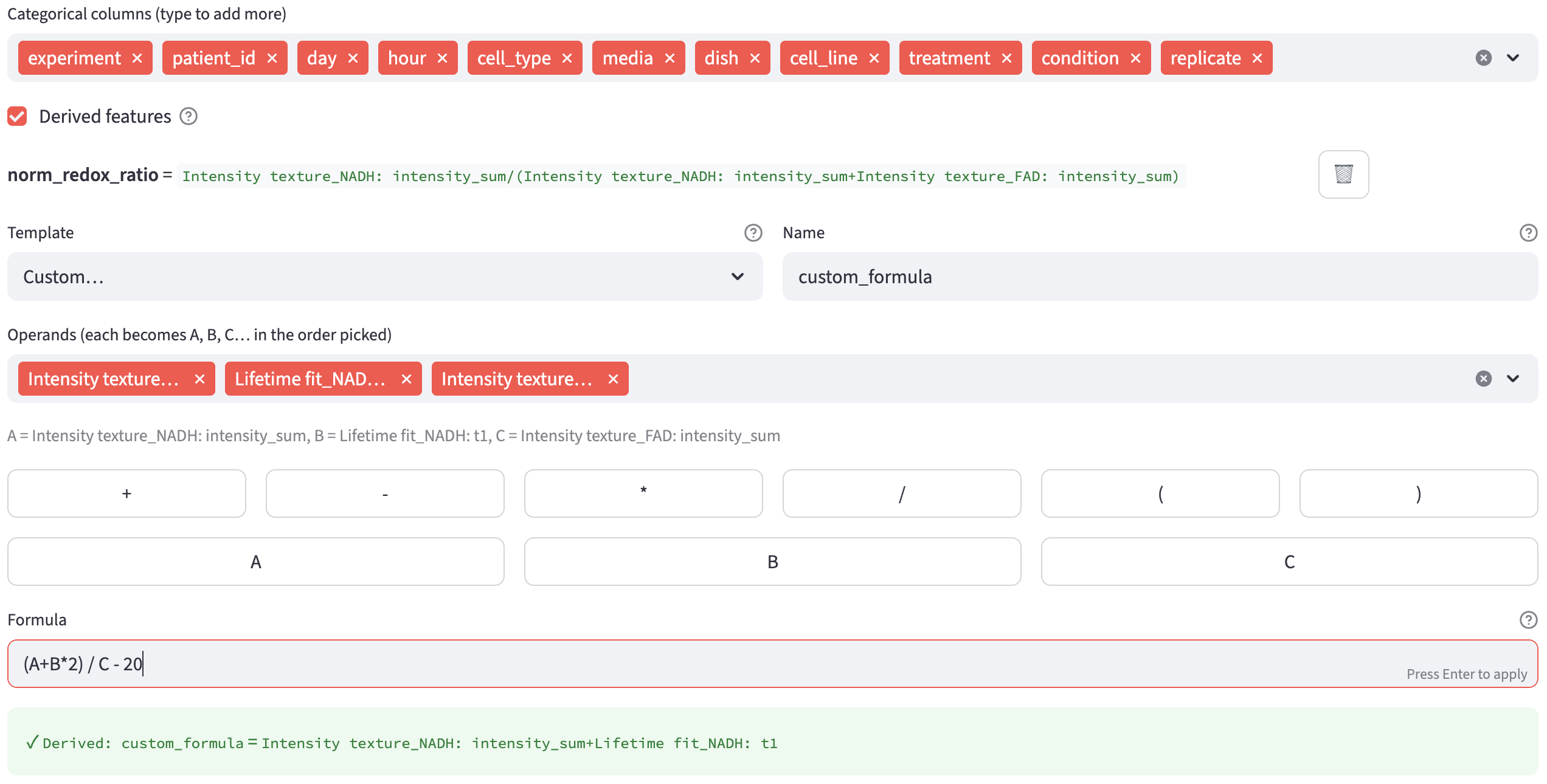
Any derived features already defined for the current profile are listed at the top, each showing its name, its expanded formula, and a 🗑️ button to delete it. Below the list, a new feature is composed from:
- a
Template(a common formula, orCustom…to write your own), - a
Name(e.g. redox_ratio) — the output column becomesDerived: <Name>, and - the operands that fill the formula.
The operands/features available for selection should span all channels. If no channel has a feature extractor selected yet, the builder shows “Select feature extractors for your channels first — there are no features to derive from yet.” — configure the extractors first, then come back.
The categorized numerical features come first. The raw bookkeeping columns — amp1, offset, reduced_chi_square, the centroid coordinates, and the a2 / a3 fit remainders — carry no extractor prefix, so they are listed after them, at the bottom of each operand dropdown. They are ordinary per-cell numbers and can be used like any other operand: a background-corrected intensity, for instance, is Intensity texture_<channel>: intensity_sum minus <channel>_offset times the number of time bins (typed as a plain number in Custom… mode, e.g. A - B*256).
A pixel-prefitted (SPCImage) channel does no fit of its own, so it contributes only its a2 / a3 remainder — no amp, offset or reduced_chi_square.
Derived features are stored per profile, so each extraction profile keeps its own set.
When the preview is valid, click ➕ Add derived feature. Adding and deleting definitions saves them immediately to the active profile.
12.1.1 Templates
Choosing a Template other than Custom… fills in the formula for you and renders one searchable dropdown per operand slot (A, B, …). Four ready-made templates are provided: normalized A / (A + B), ratio A / B, difference A - B, and sum A + B.
Each takes two operands: pick a feature for A and a feature for B, give the result a Name, and the live preview confirms it. The fifth option, Custom…, unlocks the free formula editor described next.
12.1.2 Custom Formulas
Custom… mode lets you compose an arbitrary formula. First pick the operands from the Operands (each becomes A, B, C… in the order picked) multiselect — the features you choose are aliased A, B, C, … in pick order, and a caption echoes the mapping (e.g. A = Intensity texture_fad: intensity_sum, B = …). Then build the formula in the Formula box, typing directly or using the append buttons for the operators (+ - * / ( )) and for each alias.
The formula language supports:
- the four arithmetic operators
+,-,*,/, - a leading sign (unary
+/-), - numeric constants, and
- parentheses for grouping.
Division by zero yields NaN rather than raising an error or producing infinity. Anything outside this language — function calls, exponentiation (**), modulo (%), comparisons, or a bare operand with no operator — is rejected.
12.2 Compute Derived Features
Derived features are computed during Numerical Feature Extraction, after the successful FOV results have been concatenated. The definitions from the active extraction profile are recorded in the automatically saved FOV metadata alongside the extraction settings. Each definition adds one Derived: <name> column to the output dataset.
If any cell ends up with a NaN in a derived column (for instance from a divide-by-zero or a NaN operand), a single dataset-wide warning is shown for that feature — “Derived feature name has N NaN value(s) out of M cell(s) (e.g. from divide-by-zero or a NaN operand).” As with other features, cells with NaN are not dropped from the output.
12.3 Derived Feature In Data Analysis
On the Data Analysis page, all derived features are collected into one Derived Features group in the numerical selection widgets, alongside the per channel-extractor groups. A derived feature is labeled by its plain name (e.g. redox_ratio); unlike extracted lifetime or intensity features, it carries no unit or symbol, since its meaning is entirely user-defined.